I’ve been playing the game for good two years now and have noticed just how laggy it can be compared to starting a new game. Firstly, it could have something to do with the amount of images (from the lifelog) and the hundreds of pikmin models being loaded at the same time. Or it may have had something to do with the phone hardware.
I currently have a Google Pixel 8a that struggles to perform smoothly but I started playing on an 3rd gen iPhone SE and I remember it being really smooth. Of course there were a lot less assets for the iPhone to load versus the 8a since I switched phones about 5 months after starting to play the game
In order to get better performance, I’m aware that I could erase saved images in the lifelog but I would want to avoid this option as I quite like looking back at those two years. Maybe a smarter caching system or an option to offload some assets could work?
Could anyone with different phone models let me know about their experience with performance?
The baseline performance of the SoC (CPU and GPU) in the Google Pixel series is not particularly high; compared to iPhones, they offer performance roughly equivalent to models from three or four years ago. This trend holds true even for the Pixel 10, which was released last year.
I have previously used an iPhone 16 Pro and also own an Android-based ASUS ROG Phone 8. Although the iPhone 16 Pro and ROG Phone 8 were released in the same year—and the ROG Phone 8 featured the Snapdragon 8 Gen 3, Qualcomm’s high-end SoC at the time—it still lagged behind the iPhone in terms of performance. Therefore, if you are looking for optimal performance in Pikmin Bloom, choosing an iPhone would be the better option.
I’m also playing on an iPhone 16 Pro! While I can confirm that the game runs very smoothly on this model, it’s worth noting that it still causes the phone to get significantly warm—sometimes even uncomfortably hot during longer sessions. So while iOS definitely handles the frame rate better, the heat and battery drain are still real issues here too!
I’m playing on SE 3gen, too and I can’t even stress how many times I’ve ran into overheat warning while playing PB and charging my phone…
I get it’s a pretty old phone and the battery health is definitely not at its peak and needs a repair for sure, but it’s also crazy to see the huge differences between PB and PoGo. (Re-downloaded the game awhile ago just to see the new stuff and managing some local Wayspots…) PoGo used to be notorious for its battery draining/killing feature, but now I think PB is way worse… like PoGo now does not crash at all nor overheats like PB on my current phone. It runs so much smoother and with significant less “hiccups” or bugs compared with PB, too.
I also noticed EVERY SINGLE TIME when I tap on a seedling to plant in the planter page, the app crashes. I’d have to re-open and wait for it to load and then go back just tap on the seedling again… The exact same thing happens many times when tapping on whichever Pikmin from the Pikmin tab, too…
Not sure what’s with these two very specific actions that cause PB to crash, but it is something I’d always expect now…
I play on an iPhone 15. It runs stably, but the phone gets very hot and the battery drains extremely fast. Also, the iPhone closes the game quite quickly as soon as another app is used. This points to the game’s currently very high hardware demands.
I play on an iPhone 12, phone also gets super hot like others have reported. But it’s becoming difficult to play generally, anything with an animation just hangs with the loading circle going round and round.
It’s like it cuts off my network as well, if I’m streaming music and just open Pikmin Bloom just to start planting flowers, if it hangs, it cuts the music in my other app too.
Yes I know I’m on an older phone, but Pokemon Go runs absolutely fine. I think there are too many unnecessary animations (challenges completed, and clap everyone, one…by…one…) in PB that disrupt what you’re actually trying to do (plant flowers). It could definitely do with a bit of streamlining. And I don’t even allow it access to my photos for lifelog so it’s not even full of that.
In Pokémon GO, the map features are limited to things like PokéStops and Gyms. In contrast, Pikmin Bloom renders not only Big Flowers and Mushrooms but also tens of thousands of individual flowers planted across the map, resulting in a significantly higher rendering load.
Simply turning off the display of these planted flowers would likely reduce the load considerably.
Personally, I would like to see a toggle feature for the map flowers, but before that, a screensaver function—similar to the one in Pokémon GO—should be implemented as soon as possible.
I’m not even sure if feeling a little relief should be appropriate after reading so many people having the same overheat problem even on a new phone…
Totally agree that PB has way too many unnecessary things being loaded at the same time. Even in Bird’s-Eye view, when the flowers don’t seem as dense, but all the Pikmins in the squad and the small fruits they’re carrying are still loaded on the screen. On top of that are also those shiny/particle VFX from Big Flowers or the shrooms nearby…
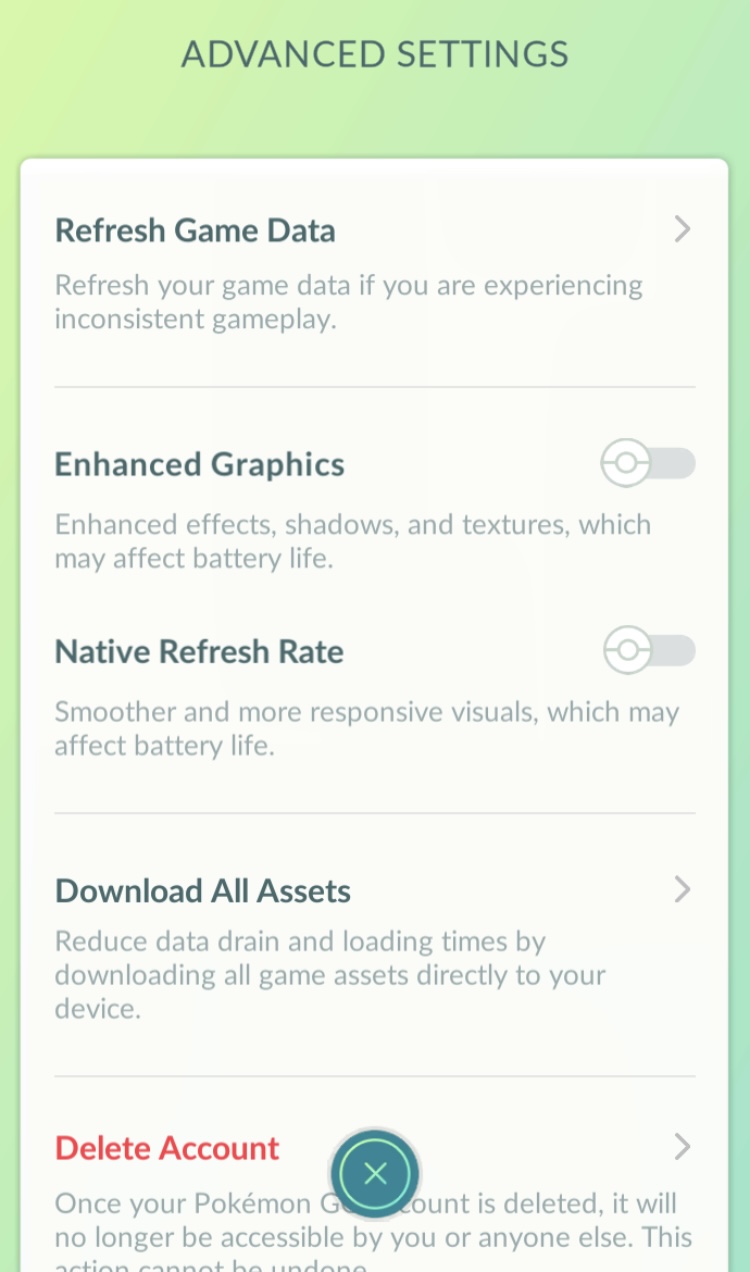
Went and checked PoGo’s settings and below are just the quality column in advanced settings, compared with PB’s bare minimum, there’s definitely a lot to improve…
Maybe it’s going to take another 5 or 6 years for PB to get such detailed settings options… but even with just simpler settings like this in Pokemon Sleep would help tremendously, I believe…
Wow.. we need this asap! My issue is the loading of all the small flowers. I live in a super urban area and just in general, planted flowers do not provide useful gameplay details. On top of loading all that, it’s also a huge accessibility issue. I’m about to make a post on that
 Maybe a smarter caching system or an option to offload some assets could work?